

Take a Photo. AI Fills the Form
Your inspector takes a photo of any asset or defect. AI reads it and fills the inspection form automatically. No typing. No manual entry.

Convert your checklist into Mobile App
Construction site inspection audit software is a scored-audit system that turns the site walk from a list-builder into a measurable, weighted, evidence-led programme aligned to ISO 9001 documented-information requirements, ISO 45001 occupational health and safety, NEC quality plan obligations, JCT inspection regimes, and FIDIC engineer audit requirements.
Available on Mobile
Inspect on iOS and Android with no internet required. Capture photos, let AI flag defects, and generate audit-ready reports in the field.
For the audit team, the platform replaces Excel audit workbooks, paper audit files, and ad-hoc photo galleries with weighted scoring per item and per section, critical-failure rules that force overall fail on flagged items, mandatory photo evidence at capture, and a closed-loop CAPA workflow that requires verified closure rather than asserted closure. The score the contract administrator sees on the audit PDF is the score the audit programme built from the field record.
What changes once construction site inspection audit software runs on one mobile-first platform.
Scored construction site audits follow a more disciplined cadence than field walks. The five-step loop below is what quality directors standardise across projects.
Author weighted audit templates per project type (residential, commercial fit-out, infrastructure, capital), contract framework (NEC, JCT, FIDIC), and trade with item weights, section weights, and critical-failure rules. The library lives in version control with named approvers aligned to ISO 9001 requirements.
Audits schedule against quality plan milestones (foundation audit, structural audit, MEP audit, finish audit, pre-handover audit). Each audit carries its own scored template, its own audit window, and its own named auditor.
Auditor runs the scored walk on the device. Every finding requires photo evidence with minimum count, required angle, and AI defect categorisation at capture. Submissions that lack required evidence are rejected at submission.
Audit findings auto-route to named owners with deadline, severity-matched verification, and photo-verified closure. Critical findings escalate to the construction director and the contract administrator. Repeat findings carry the full audit history.
Scored audit PDFs export with the evidence index, the CAPA trail, and the version of the audit template in force. Portfolio dashboards aggregate scored results across projects, trades, and subcontractors.
Everything your field team does on paper, Inspectly360 does automatically: faster, more accurate, and without the admin.
Your inspector takes a photo of any asset or defect. AI reads it and fills the inspection form automatically. No typing. No manual entry.

Inspectors speak their observations in any language. AI transcribes and fills the form in real time. Completely hands-free in the field.

The moment an inspection is submitted, a branded PDF, Excel, or CSV report generates automatically. No manual work. No waiting.

Inspectly360 integrates with the tools your team already uses, including Zoho, Microsoft 365, and SAP. No double entry.

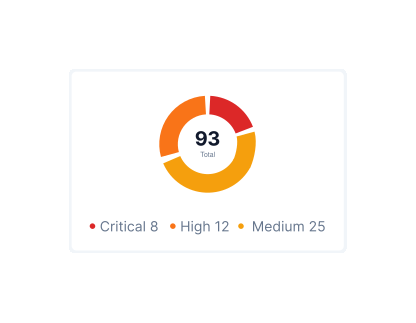
Your operations team sees completion rates, open issues, and compliance scores across all sites in real time. No chasing updates.
Manage every checklist in one connected workspace, capture evidence on mobile at the point of work, and let AI turn field inputs into clear, stakeholder-ready reports in minutes.





See which checklists your team has in progress across every site, jump into the same inspection with one tap, and keep field, supervisor, and back-office views in sync without sending screenshots on WhatsApp.






Every team reports differently. Build the report your operations, quality, or compliance leads actually want to read, share it as a branded PDF, and schedule delivery to the stakeholders who need it.



See completion, pass rate, and recurring findings across every checklist and every site, without pulling spreadsheets together at the end of the month.
What changes once construction site inspection audit software is standardised on Inspectly360.







“Inspectly360 transformed how we manage site safety inspections. The offline capability alone saved us countless hours. Our compliance rate jumped from 72% to 96% in just three months.”
Sarah Mitchell
Meridian Construction Group

“The AI-powered defect detection has changed how we work. Our inspectors capture photos and the system flags issues we'd have missed. It's like having an expert reviewer on every site visit.”
James Chen
Pacific Manufacturing Co.
“Rolling out digital checklists across multiple projects gave us instant visibility into recurring safety issues. We now resolve critical findings in hours instead of days.”
Olivia Carter
Northbridge Infrastructure
Get started with inspection and audit checklist templates.

Catch defects before handover and generate punch list reports in minutes. Room-by-room finish checks, evidence, and corrective actions.

Pre-handover snagging for new build apartments. Room-by-room finish checks, MEP, and defect tracking before keys.

Utilize this Scaffolding Safety Inspection Checklist to spot hazards, verify stability, and ensure compliance with safety standards before work begins.

Capture job details, measurements, work performed, photos, and sign-offs in one structured field service report form.
Use these apps to run inspections and audits.

by Inspectly360
Execute construction audits with structured findings, assignment tracking, and verified closure.
by Inspectly360
Run programme and package audits with weighted apps, findings, actions, and client-ready summaries.

by Inspectly360
Run construction quality assurance workflows with inspection evidence, review controls, and closure tracking.

by Inspectly360
Run construction quality control checks with defect evidence, owner tracking, and closure verification.
by Inspectly360
Run construction inspections with AI-assisted issue prompts, photo context, and faster structured reporting.
Each audit item carries a configurable weight, commonly on a 1-10 scale or a low-medium-high-critical band, and section weights aggregate the item scores into a section result. Critical-failure rules sit on top of the arithmetic: any critical-item fail forces an overall fail regardless of the total score. This matters most at handover, because a 95% score on a project with one critical structural NCR and a 95% on a project with 50 minor finish defects are not the same outcome at all. Weighted scoring is how the contract administrator distinguishes them, so a high headline number can never disguise an unresolved structural or life-safety issue when the building is handed over.
Each audit item supports its own photo-evidence rules: a minimum and maximum photo count, a required angle or subject, mandatory AI defect categorisation, and an on-device watermark carrying time, GPS, and the auditor's name. The submission flow rejects any finding that lacks the required evidence, so the auditor cannot complete the audit until the evidence is in place. Where signal is unavailable, the validation runs locally on the device, so the rule still holds offline on the basement levels and remote site areas where construction audits often happen. The result is that the handover evidence pack is built as the audit runs rather than reconstructed afterwards, and every scored item is backed by an image the contract administrator can open.
Audit findings auto-route to a named owner based on the trade, the severity, and the project assignment, so nothing waits in a shared inbox for someone to claim it. Verified closure requires a photo-evidence upload, a severity-matched approval, and a final verification by the auditor or quality director. Asserted closure, where a subcontractor simply says they fixed it, does not pass verified closure, so 'marked done' and 'actually fixed' finally line up. Because the routing matches the severity to the right approver, a critical structural finding gets engineer-level scrutiny while a minor finish defect is handled efficiently, and the quality director keeps a live view of what is open, overdue, and verified closed across every project.
Both standards expect documented-information governance: versioned templates, approval workflows, change audit trails, internal-audit evidence, and CAPA closure trails. Inspectly360 produces all of these as audit-grade event logs that export in one click, scoped to the certification boundary and the surveillance window. ISO 9001 and ISO 45001 surveillance auditors get scoped read-only access for that window, so they review the live record rather than waiting for the team to assemble one. Because the evidence is a by-product of normal site audits rather than something prepared for the visit, a surveillance audit becomes a walkthrough of records that already exist instead of a scramble to reconstruct them across a dozen concurrent projects.
Yes. Portfolio dashboards aggregate scored audit results by project type, by trade, by named subcontractor, by contract framework, and by audit cycle, so leadership compares like with like across the portfolio. Trend analysis surfaces repeat findings that recur across different projects, which is the systemic pattern a single-project view can never see. CAPA closure rate per trade becomes a leading indicator of subcontractor performance, sitting alongside their NCR rate and hold-point compliance. That lets a construction director rank projects, trades, and subcontractors on objective scored data, target attention where the numbers are slipping, and carry the same evidence into the next tender qualification rather than relying on impression.
FIDIC engineer audits export in the format the engineer expects, carrying the inspection record, the NCR closure trails, and the version of the quality-plan template that was in force at the time. NEC contract administrator reviews and JCT defects schedule reviews export in their own framework-specific formats, with retention aligned to the contract type. Because the platform holds the template version, the named approvers, and the timestamped evidence behind each inspection, the engineer or contract administrator reviews a complete, contemporaneous record rather than a reconstruction. That is what keeps a payment milestone or a handover certificate from stalling while the team hunts for the inspection evidence the contract requires before the engineer will sign.
See Inspectly360 in action with a live demo tailored to your needs. No credit card required.













