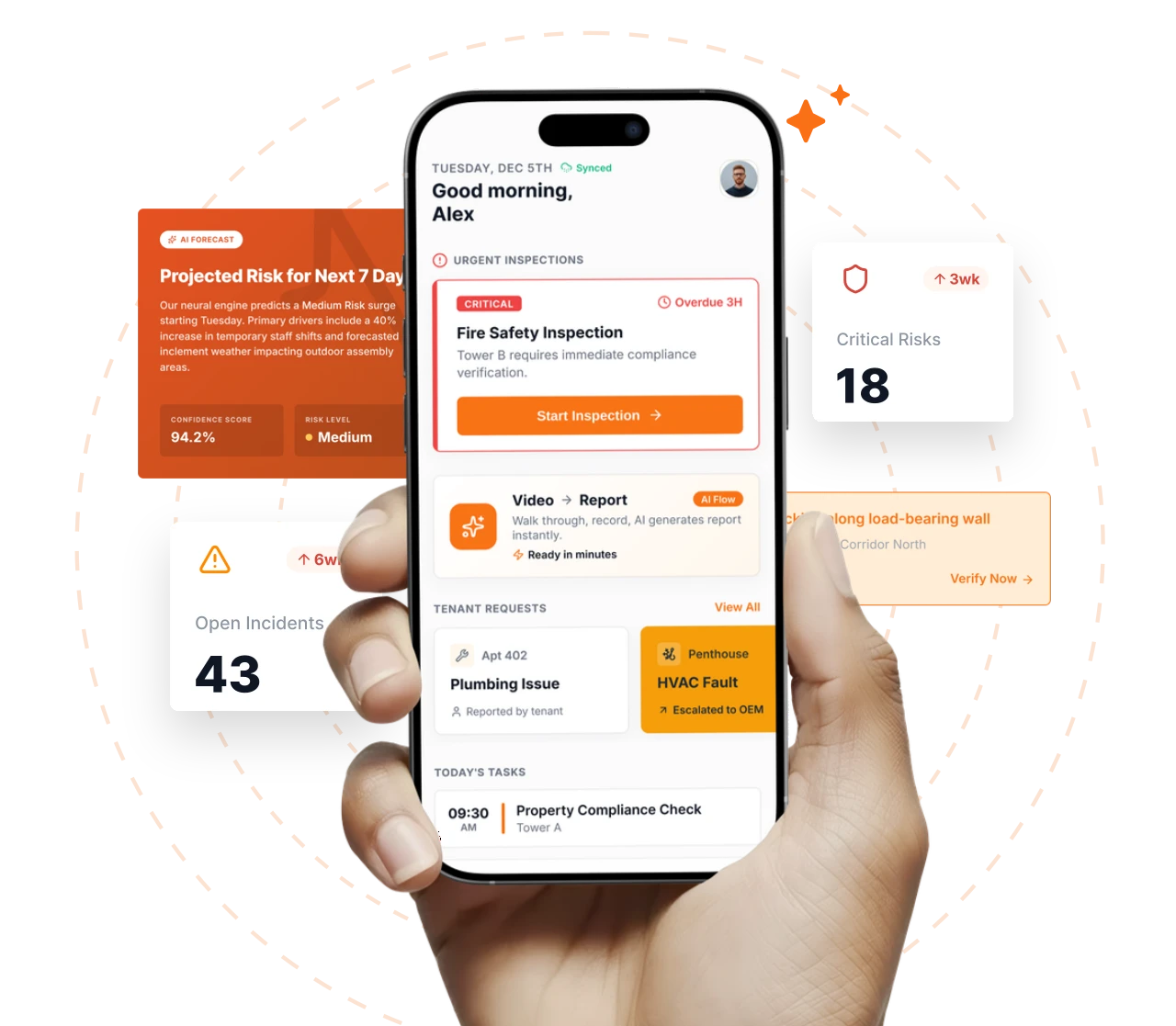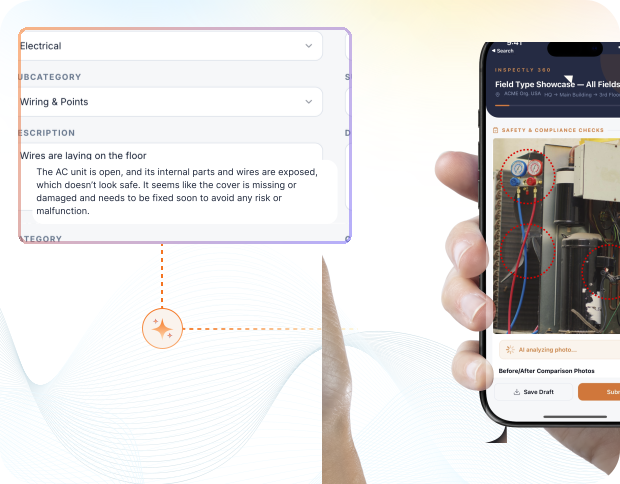
Take a Photo. AI Fills the Form
Your inspector takes a photo of any asset or defect. AI reads it and fills the inspection form automatically. No typing. No manual entry.

Convert your checklist into Mobile App
Cold Room Inspection Tracking Software is the platform Operations Directors, Compliance Managers, and Site Leads use to run cold room inspection tracking programmes with defensible field evidence across every site in the portfolio. Inspectly360 turns approved checklists into repeatable mobile execution: the same controls, evidence rules, and corrective-action routing on every visit and every cycle.
Everything your field team does on paper, Inspectly360 does automatically: faster, more accurate, and without the admin.
Your inspector takes a photo of any asset or defect. AI reads it and fills the inspection form automatically. No typing. No manual entry.
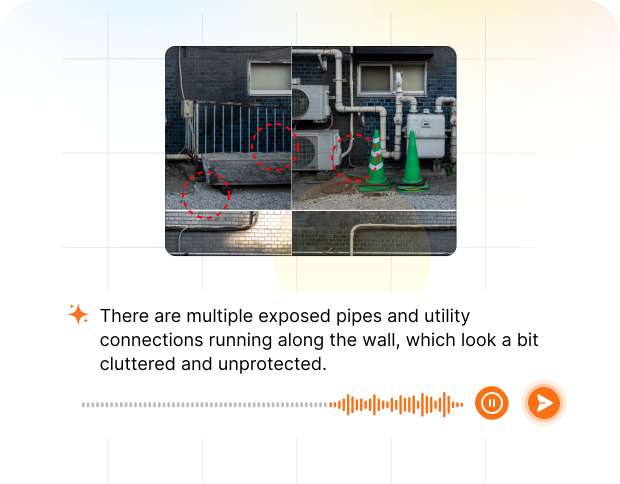
Inspectors speak their observations in any language. AI transcribes and fills the form in real time. Completely hands-free in the field.
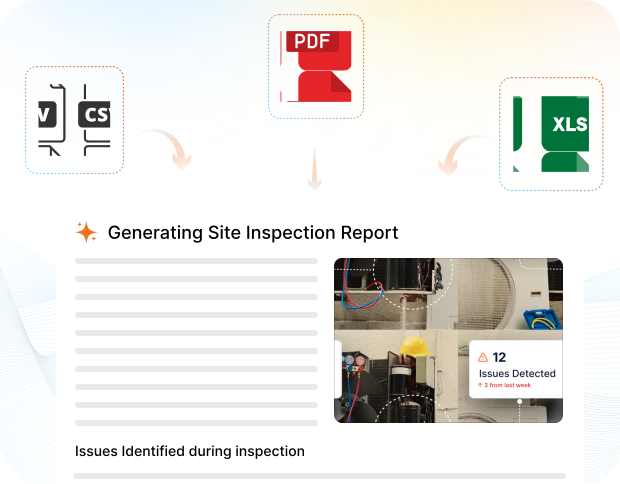
The moment an inspection is submitted, a branded PDF, Excel, or CSV report generates automatically. No manual work. No waiting.
Inspectly360 integrates with the tools your team already uses, including Zoho, Microsoft 365, and SAP. No double entry.
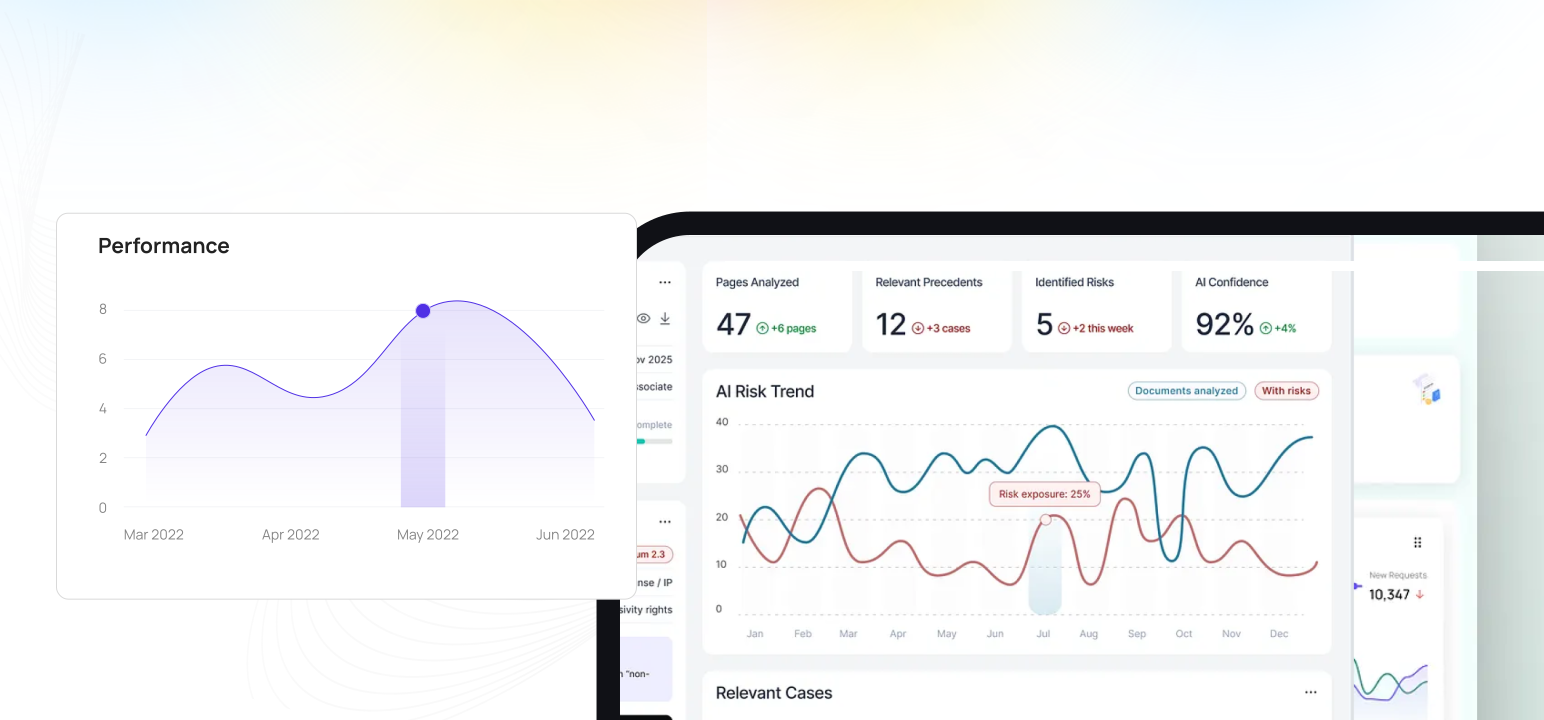
Your operations team sees completion rates, open issues, and compliance scores across all sites in real time. No chasing updates.
What changes once cold room inspection tracking software runs on one mobile-first platform with photo proof and live dashboards.
Cold Room Inspection Tracking Software is the platform Operations Directors, Compliance Managers, and Site Leads use to run cold room inspection tracking programmes with defensible field evidence across every site in the portfolio. Inspectly360 turns approved checklists into repeatable mobile execution: the same controls, evidence rules, and corrective-action routing on every visit and every cycle. Cold Room Inspection Tracking Software gives Operations Directors SLA monitoring, and defect tracking across multi-site Food & Beverage programmes.
The pain it solves is familiar to multi-site food & beverage operators: inspections scattered across paper, chat, and spreadsheets; findings that nobody can reconstruct at audit time; and leadership visibility that arrives days late. Inspectly360 replaces that fragmentation with one record per asset, per site, and per programme.
For field teams, capture runs offline on iOS and Android with photo evidence and named sign-off. For management, every submission feeds portfolio dashboards, overdue-action alerts, and exports leadership can share with clients, insurers, or regulators without manual assembly.
Food & Beverage rollout follows a measured sequence: prove the inspection layer on one cluster of sites, then scale templates and dashboards before the next audit or contract review.
For Food & Beverage teams running cold room inspection tracking, cold Room Inspection Tracking controls become digital templates with mandatory evidence and asset QR codes, so every site inspects against the same standard.
In Food & Beverage cold room inspection tracking operations, inspectors work the cold room inspection tracking template offline, and every entry syncs with its timestamp and author once connectivity returns.
Across the cold room inspection tracking portfolio, failed cold room inspection tracking items become owned tasks with deadlines and photo-verified closure before the next inspection cycle.
Cold Room Inspection Tracking performance reaches Operations Directors as live dashboards and shareable exports, not as a reconstructed monthly slide pack.
Answers to common long-tail questions, kept on one canonical page to avoid thin duplicate URLs.
Start with a single cold room inspection tracking template and one cluster of sites. Validate completion rates, closure time, and audit-pack assembly before scaling across the portfolio.
Roll out role-based access for contractors and in-house teams. Align templates to your food & beverage standards and statutory obligations.
Enable portfolio dashboards, branded PDF exports, and API integrations with your CMMS or GRC stack where required.
The platform capabilities that power cold room inspection tracking software across every site.
Operations Directors, Compliance Managers, and Site Leads comparing Inspectly360 to paper checklists, WhatsApp photo threads, and spreadsheet trackers see the difference fastest on evidence defensibility, corrective-action closure, portfolio visibility, contractor accountability, and audit-ready exports for cold room inspection tracking programmes.
| Topic | Typical Gaps | With Inspectly360 |
|---|---|---|
| Cold Room Inspection Tracking evidence defensibility | Cold Room Inspection Tracking checks are ticked on paper or in chat with no timestamped photo proof tied to the asset or location. | Every cold room inspection tracking record carries inspector identity, timestamp, and required photos before sign-off. |
| Corrective action closure | Failed items age in email without owner, deadline, or verified closure proof. | Failed items become tracked tasks with severity, owner, and photo-verified closure. |
| Multi-site portfolio visibility | Each site emails weekly summaries. Leadership reconciles spreadsheets instead of seeing live risk. | Live dashboards show completion rates, overdue findings, and SLA breaches per site. |
| Offline field capture | Inspectors skip photos or defer entries when basements, plants, or remote sites lack signal. | Inspections run fully offline and sync when connectivity returns without re-keying. |
| Audit-ready exports | Audit packs are assembled manually from folders, drives, and email threads before each review. | Branded PDF exports and structured history assemble audit packs in minutes. |
What changes once cold room inspection tracking software is standardised on Inspectly360.
Get started with inspection and audit checklist templates.

Food safety and hygiene inspections: temperature checks, cleanliness, HACCP points, and corrective actions. Audit-ready evidence.

Food safety officers use this inspection for food safety hygiene to verify food condition and safety controls, hygiene verification and compliance records and photo evidence, capture photo evidence on every finding, and track corrective actions to verified closure, building the evidence food-beverage teams need for FSSAI, HACCP and ISO 22000.
Food safety officers use this inspection for iso 22000 food safety checklist fsms to verify iso condition and safety controls, 22000 food verification and compliance records and photo evidence, capture photo evidence on every finding, and track corrective actions to verified closure, building the evidence food-beverage teams need for FSSAI, HACCP and ISO 22000.

Food safety officers use this inspection for restaurant visit report to verify restaurant condition and safety controls, visit verification and compliance records and photo evidence, capture photo evidence on every finding, and track corrective actions to verified closure, building the evidence food-beverage teams need for FSSAI, HACCP and ISO 22000.
Use these apps to run inspections and audits.
Cold Room Inspection Tracking Software is the mobile tool Food Safety Managers use to run cold room issue tracking across every food & beverage site from one app. Inspectors record findings, readings, and photos on site, even with no signal, and each cold room check syncs when the connection returns. Every cold room record carries the inspector, the time, and the photos needed to prove the check happened. Repeat failures on the same cold room are flagged, so teams address the cause instead of patching it again.
Cold Room Inspection Tracking Software adds the cold room field layer your systems of record never had. Your system of record keeps work orders and finance; this keeps the cold room issue tracking layer where the evidence is captured. Photos and a signature attach to every check, which is what a client or FSSAI assessor asks to see later. Risk shows per site as results sync, so leadership stops reconciling site reports by hand.
Cold Room Inspection Tracking Software serves everyone from the inspector on site to Food Safety Managers in head office. QA Leads pull the audit pack on demand, so the people accountable for FSSAI are not left chasing evidence. Each cold room issue tracking round is finished in the field, with the photos and a named sign-off attached before it submits. Client, insurer, and FSSAI packs export as a branded PDF in one click.
Cold Room Inspection Tracking Software reports cold room performance live, without anyone compiling it. Client, insurer, and FSSAI packs export as a branded PDF in one click. One dashboard covers the estate, with every site running the same cold room issue tracking the same way. Because evidence is captured as the work happens, the cold room trail still stands up months after the visit.
Cold Room compliance is something Cold Room Inspection Tracking Software records as the work happens, not after. When an assessor arrives, the FSSAI pack is already built as a branded PDF and a searchable history. Photos and a signature attach to every check, which is what a client or FSSAI assessor asks to see later. Over time the same data shows which cold room assets and sites generate the most work.
Cold Room Inspection Tracking Software keeps the field team working on food & beverage sites with dead spots. Each cold room issue tracking round is finished in the field, with the photos and a named sign-off attached before it submits. The record shows what was checked, when, and by whom, so QA Leads can answer a query without rebuilding it from folders. One dashboard covers the estate, with every site running the same cold room issue tracking the same way.
Cold Room Inspection Tracking Software on Inspectly360 connects directly to the inspection apps, checklist templates, forms, industries, and adjacent solutions linked below.
See Inspectly360 in action with a live demo tailored to your needs. No credit card required.