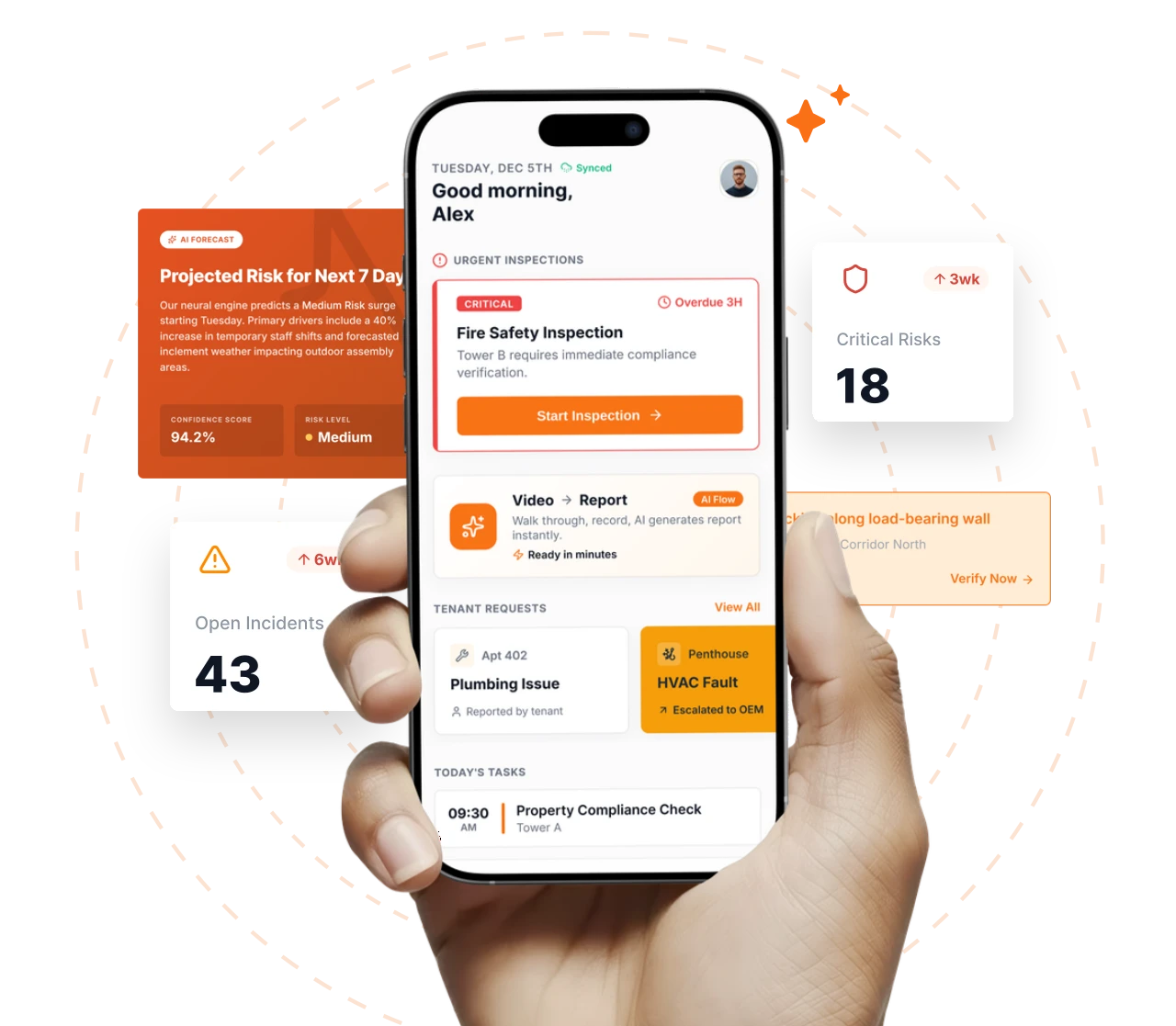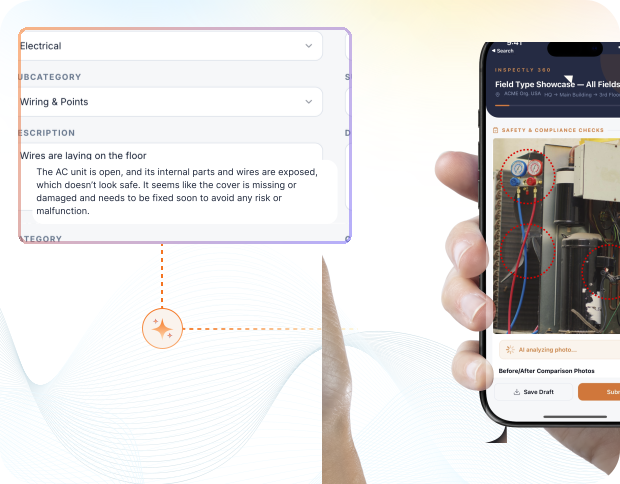
Take a Photo. AI Fills the Form
Your inspector takes a photo of any asset or defect. AI reads it and fills the inspection form automatically. No typing. No manual entry.

Convert your checklist into Mobile App
Building inspection management software is the portfolio-scale governance layer above individual building inspections: who must inspect what across the portfolio, which programme version runs at each property, who reviews findings, how snags close through their contractual liability windows, and how the evidence rolls up for lender, REIT, and investor reporting.
Everything your field team does on paper, Inspectly360 does automatically: faster, more accurate, and without the admin.
Your inspector takes a photo of any asset or defect. AI reads it and fills the inspection form automatically. No typing. No manual entry.
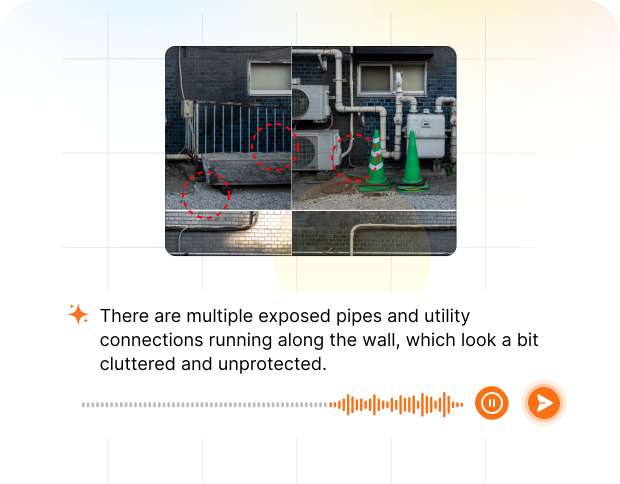
Inspectors speak their observations in any language. AI transcribes and fills the form in real time. Completely hands-free in the field.
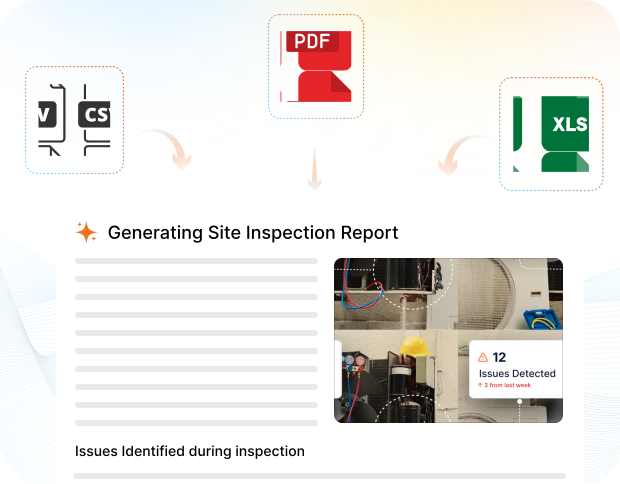
The moment an inspection is submitted, a branded PDF, Excel, or CSV report generates automatically. No manual work. No waiting.

Inspectly360 integrates with the tools your team already uses, including Zoho, Microsoft 365, and SAP. No double entry.
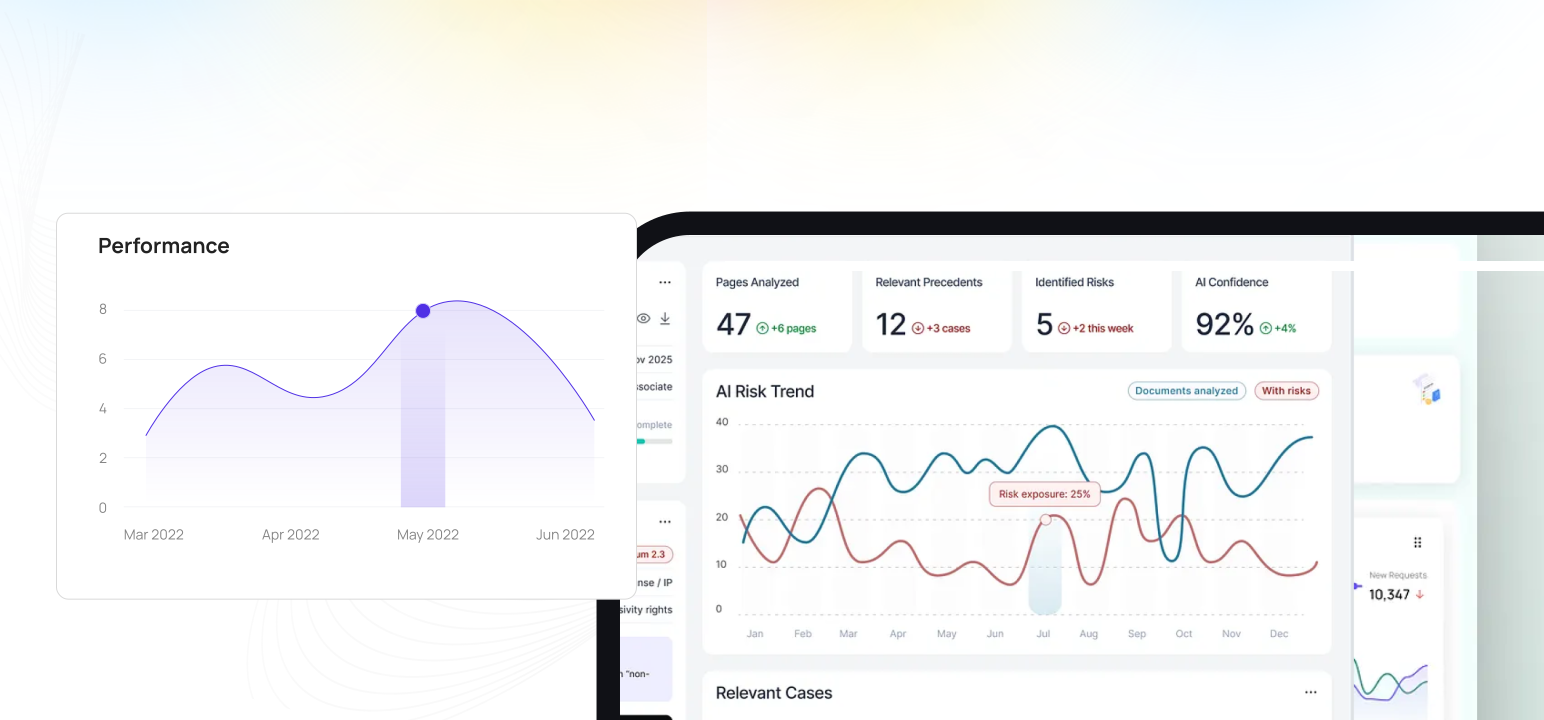
Your operations team sees completion rates, open issues, and compliance scores across all sites in real time. No chasing updates.
What changes once building inspection management software runs on one mobile-first platform with photo proof and live dashboards.
Building inspection management software is the portfolio-scale governance layer above individual building inspections: who must inspect what across the portfolio, which programme version runs at each property, who reviews findings, how snags close through their contractual liability windows, and how the evidence rolls up for lender, REIT, and investor reporting. Inspectly360 ties scheduling, RBAC, programme versioning, and portfolio analytics so real estate operations leaders see coverage gaps before tenants, lenders, or regulators do across residential, commercial, and capital project portfolios.
The problem most portfolio managers share is governance drift across building types. Residential turn programmes need one cadence; commercial handovers need another; capital project completions need a multi-year programme with warranty-period markers. Excel-driven schedules and PMS modules force every building into the same generic workflow. Inspectly360 ends the forced-fit by carrying separate programme variants per building type with shared RBAC, shared audit trail, and shared portfolio rollup.
The outcome is portfolio governance lenders and REIT boards actually trust. Coverage heatmaps show which properties are on track. Statutory risk surfaces 90, 60, 30 days before expiry. Lender due diligence pulls structured evidence rather than reconstructed memory. Property management firms operating multi-client portfolios stay in their lane with client data scoped and engagement boundaries clean.
Most portfolio managers implement these controls in this order before scaling building governance across the full property portfolio.
Build residential turn programmes, commercial handover programmes, capital project completion programmes, and statutory-only programmes as separate variants in the same library. Each variant inherits the corporate parent and layers building-type specific controls.
Each building gets the programme variants appropriate to its type. A residential tower runs the residential turn programme plus the statutory programme. A commercial office runs the commercial handover programme plus statutory. A capital project runs the completion programme until handover, then transitions to operational programmes.
Portfolio Manager (portfolio read, programme approval), Asset Manager (asset class read and write), Property Manager (building-level write), Building Manager (operational shift write), Surveyor (engagement-scoped), Contractor (assigned scope only), Lender Auditor (scoped read for due diligence).
Configure portfolio dashboards and report templates aligned to lender, REIT board, and investor reporting requirements. Quarterly reports regenerate from live evidence so due-diligence retrieval is structured rather than reconstructed.
Coverage heatmaps surface variance worth a portfolio manager's decision. Programme cost allocation tracks inspection cost per building, per programme, per contractor for cost-recovery and service-charge calculations.
Answers to common long-tail questions, kept on one canonical page to avoid thin duplicate URLs.
FM inspection management focuses on operational rounds, PPM, AMC, and contractor scoping across sites. Building inspection management focuses on the building-specific lifecycle: statutory checks per building, condition reports, tenant turn programmes, capital project handover, and defects liability period tracking. Many real estate portfolios need both; the buyer-language difference matters because portfolio managers and FM directors evaluate against different criteria. Inspectly360 supports both on one platform with appropriate programme variants so a real estate portfolio with embedded FM operations can run both governance models without duplicating evidence.
REIT operations leads and lender relationship teams have specific evidence requirements: quarterly condition assertions backed by photo evidence, statutory compliance proof for due-diligence retrieval, capital expenditure forecasts grounded in trended condition data, and structured snag-closure evidence for liability period claims. Inspectly360 programme design reflects these requirements: condition assessment programmes run on the cadence REITs require, statutory programmes retain evidence to lender-mandated windows, and capex-relevant condition scoring feeds into the forward-looking maintenance forecast. Quarterly board packs regenerate from live evidence each cycle.
Capital project programmes carry a different shape from operational programmes. Construction completion runs as a snag-and-closure workflow through handover; the warranty or defects liability period typically runs for 12 to 24 months after handover, during which any snag raised becomes a contractor obligation. Inspectly360 supports the full lifecycle: pre-handover snag identification, handover sign-off with named contractor commitments, in-warranty snag tracking with contractor accountability, and warranty-period expiry tracking for cost-allocation conversations. Snag visibility survives project team rotation.
Portfolio managers commission third-party surveyors (RICS-qualified firms, certification bodies, inspection firms) for engagement-specific scope: annual condition surveys, pre-acquisition due diligence, dilapidations assessments, RERA pre-handover verification. Each engagement gets scoped, time-bound RBAC for the assigned buildings and inspection types only. Engagement closure is workflow-driven: working papers finalise, the deliverable is signed off, external user access expires automatically, and the full evidence chain stays retained for the portfolio owner.
The platform capabilities that power building inspection management software across every site.
Real estate portfolio managers, REIT operations leads, and property management firms comparing Inspectly360 to property management system scheduling, Excel inspection calendars, email-driven contractor coordination, and IWMS modules see the difference fastest on five dimensions: portfolio-scale coverage discipline, REIT-grade reporting evidence, residential-versus-commercial workflow separation, third-party surveyor engagement boundaries, and capital project programme support across multi-year construction cycles.
| Topic | Typical Gaps | With Inspectly360 |
|---|---|---|
| Portfolio coverage discipline | Building inspection schedules in Excel per property. Coverage gaps surface during the annual lender review or when a tenant raises a complaint. | Scheduled programmes publish to every building automatically. Coverage heatmaps surface overdue rounds and at-risk statutory cycles before tenants or lenders notice. |
| REIT-grade reporting evidence | Lender, REIT, and investor reports assembled from manager emails on quarter-end. Evidence behind condition statements gets reconstructed under time pressure. | Portfolio dashboards generate lender, REIT, and investor reports from live evidence with timestamps, photos, and signed attestations attached for due-diligence retrieval. |
| Residential vs commercial workflow separation | Residential unit turns and commercial handovers share the same generic template; managers force the building into the form they have rather than the form they need. | Versioned template library separates residential turn programmes, commercial handover programmes, and capital project programmes; each runs the workflow appropriate to its scope. |
| Third-party surveyor and contractor access | Lift inspectors, electrical contractors, RICS surveyors, and statutory inspectors get folder access. Engagement boundaries blur; client data co-mingles without scoping. | Third-party surveyors, statutory contractors, and inspection firms get scoped, time-bound RBAC for assigned buildings and engagements only. Engagement closure is workflow-driven. |
| Capital project programme support | Capital project handover snag lists live in contractor emails for two years until the warranty period closes. Snag visibility drops the moment the project team rotates. | Capital project programmes carry multi-year snag lifecycles with named contractors, deadlines, warranty-period markers, and audit trail beyond project team rotation. |
What changes once building inspection management software is standardised on Inspectly360.
Get started with inspection and audit checklist templates.

This checklist is designed for conducting thorough workplace inspections to identify hazards and ensure compliance with safety regulations. It promotes...

This template is used to conduct a fire extinguisher inspection every 30 days to determine if the equipment meets the...
Use these apps to run inspections and audits.

by Inspectly360
Building condition and compliance inspections with evidence and follow-ups.

by Inspectly360
Property and real estate inspections, condition reports, and tenant checks.

by Inspectly360
Streamline facilities inspections with forms, photos, and reports.

by Inspectly360
Audits and inspections with scoring, evidence, and reports.

by Inspectly360
Compliance-focused inspections with evidence and audit trails.
Mixed portfolios need programme separation by building type rather than one universal template. Inspectly360 supports per-type programme variants forked from a corporate parent: a residential tower runs the residential turn programme (move-in, move-out, common-area, statutory); a commercial office runs the commercial handover programme (MEP, fit-out, statutory, fire NOC); a capital project runs the completion programme (snag list, structural sign-off, as-built information per ISO 19650). Each variant inherits the corporate parent for shared statutory controls and layers building-type specific controls on top. Programme owners maintain variants without re-creating the shared base.
REIT and lender reporting typically requires quarterly portfolio condition assertions backed by photo evidence, statutory compliance proof per building, capital expenditure forecasts based on condition trends, and structured snag closure evidence within defects liability windows. Inspectly360 supports these through configured dashboards that regenerate from live evidence each quarter: condition assertions reference the underlying inspection record, statutory compliance proof pulls per building per obligation, capex forecasts derive from AI-trended condition scoring, and snag closure evidence retains for lender-mandated retention windows. Due diligence retrieval happens from the platform rather than from manager-email reconstruction.
The residential turn workflow runs on a tenant-cycle cadence: move-out inspection with photo evidence and deposit-relevant findings, common-area inspection, maintenance and refurbishment scheduling, move-in inspection with the new tenant signed acceptance. The commercial handover workflow runs on the lease-grant or fit-out completion cadence: MEP commissioning sign-off, fit-out completion verification, fire NOC pre-audit, lift licence verification, accessibility verification, and multi-party owner-contractor-tenant handover sign-off. Both workflows are supported on the same platform with different programme variants. Building managers typically run both for mixed-use buildings.
Programme cost allocation tracks inspection cost per building, per programme variant, per contractor engagement. Costs feed into three downstream calculations: service-charge apportionment (commercial buildings recover programme costs from tenants per the lease formula), cost-recovery (capital project programmes recover from the construction contract), and capex justification (forward-looking maintenance budgets reference programme cost trends). The platform records cost at the programme execution level, so service charges and cost recovery rest on actual evidence rather than estimates. Cost data exports to the property management system or finance platform via API for downstream service-charge accounting.
RICS-qualified surveyor firms commissioned for annual condition surveys, pre-acquisition due diligence, or dilapidations assessments get scoped, time-bound RBAC for the engagement only. Access scope: the assigned buildings (sometimes the whole portfolio for portfolio-wide surveys, sometimes a subset for transaction-specific work), the engagement-specific programme variant, working-paper write access, and reviewer notes. The surveyor's working papers stay retained for the portfolio owner after engagement closure. Surveyor RBAC expires automatically at engagement end. Surveyors can run multi-client portfolios on the platform without cross-leakage between clients.
Capital project programmes carry distinct lifecycle phases: pre-handover snag identification (typically 4-12 weeks before practical completion), handover sign-off with named contractor commitments and the defects liability period start date, in-warranty snag tracking (typically 12 to 24 months of warranty), and warranty expiry tracking for cost-allocation conversations. Snag visibility survives project team rotation because the snag carries the programme, the building, the named contractor, and the warranty marker rather than relying on whoever happens to remember it. Pre-handover snag lists meet RERA defect-liability evidence standards.
Building Inspection Management Software on Inspectly360 connects directly to the inspection apps, checklist templates, forms, industries, and adjacent solutions linked below.
See Inspectly360 in action with a live demo tailored to your needs. No credit card required.